Introducing Myfxbook Loyalty Points: Earn Rewards as You Trade, Share, and Engage

We’re excited to introduce Myfxbook Loyalty Points, a new rewards program designed to give traders more value from the activities they already do across Myfxbook.

With Loyalty Points, members can collect points by completing eligible actions, reaching milestones, and unlocking rewards such as funded prop accounts and broker account opportunities. The more you participate, the closer you get to your next reward.

What Are Myfxbook Loyalty Points?

Loyalty Points are a new way to reward active Myfxbook members.

By taking part in selected activities across Myfxbook, users can earn points and build progress toward reward milestones. These milestones unlock trading-related rewards, starting with a $5,000 Prop Account at 3,000 points.

The rewards program is built to make your Myfxbook experience even more engaging, whether you’re exploring prop firms, opening accounts with participating brokers, subscribing to updates, referring friends, or sharing your trading activity.

Rewards You Can Unlock

As you collect points, you can unlock bigger rewards at each milestone. Current reward milestones include:

RewardPoints Required
$5,000 Prop Account3,000 points
$10,000 Prop Account4,500 points
$25,000 Prop Account9,000 points
$50,000 Prop Account16,000 points
$100,000 Prop Account30,000 points
$1,000 Broker Account50,000 points
$200,000 Prop Account60,000 points

These milestones are designed to give traders a clear path from first rewards to larger opportunities as they continue earning points.

How to Earn Points

There are several ways to start earning Loyalty Points on Myfxbook.

You can earn points by completing eligible activities such as purchasing prop challenges, opening accounts with participating brokers, subscribing to the Loyalty Newsletter, taking part in daily polls, referring friends, and sharing successful trades. Myfxbook notes that participating broker offers can be identified by the rewards icon.

Some activities may award a fixed number of points, while others may offer higher earning potential depending on the action. For example, the rewards page highlights prop challenge purchases, participating broker account openings, and the Loyalty Newsletter as point-earning opportunities.

Why We Built Loyalty Points

Myfxbook has always focused on giving traders tools, data, and community features that help them make more informed decisions. Loyalty Points adds another layer to that experience: rewarding users for engaging with the platform and discovering opportunities that may support their trading journey.

Whether you’re comparing prop firms, reviewing brokers, following market updates, or staying active in the community, the rewards program gives you a new reason to get more out of Myfxbook.

How Rewards Work

Once an eligible action is completed and approved, points are added to your balance. When you redeem a reward, the required points are deducted from your available balance.

A few important program rules:

Points have no cash value, cannot be transferred, and do not expire. Some actions may only be completed once, while repeatable actions are clearly marked. Myfxbook may reverse points in cases of abuse, fraud, or misuse, and serious misuse may result in account suspension.

Start Earning Today

Loyalty Points are now live on Myfxbook: https://www.myfxbook.com/rewards

Log in to your Myfxbook account, visit the Rewards page, and start completing eligible actions to move closer to your next milestone. Whether your first goal is a $5,000 Prop Account or you’re aiming for a larger reward, every approved action brings you one step closer.

Start earning Loyalty Points today and unlock more from your Myfxbook experience.

Introducing Strategy AI: Create MT5 Trading Strategies Without Coding

We’re excited to introduce Strategy AI, a new Myfxbook tool that helps traders create, test, and manage automated trading strategies for MetaTrader 5 — without writing code.

With Strategy AI, you can turn trading ideas into ready-to-use MT5 Expert Advisors, run cloud-based backtests, compare strategy versions, and download generated code when you’re ready. It’s designed to make strategy development faster, simpler, and more accessible for every trader.

From Idea to Strategy in Minutes

Building an automated trading strategy has traditionally required programming knowledge, a detailed technical specification, and multiple rounds of development, testing, and debugging.

Strategy AI changes that.

Instead of coding manually, you define your trading preferences and let Strategy AI generate the strategy for you. The tool uses AI to combine trading logic, indicators, and risk parameters, producing MT5 Expert Advisors in seconds to minutes depending on complexity.

That means traders can move from idea to execution much faster — whether they are testing a simple concept or experimenting with more advanced trading logic.

No Coding Required

Strategy AI is built for traders, not just developers.

You don’t need programming knowledge to create an EA. Strategy AI handles the generation process, creating ready-to-use MT5 Expert Advisors based on your selected preferences. Advanced users can still edit the generated code in MT5’s editor, but the goal is to minimize the need for manual coding.

This makes automated strategy creation accessible to beginners while giving experienced traders a faster way to prototype and test new ideas.

Build, Backtest, and Improve

Strategy AI is more than a code generator. It gives traders a complete workflow for developing strategies.

You can create strategies instantly, automatically generate the code, and download it anytime. You can also run unlimited backtests in the cloud, without installing software or relying on your own machine, and Myfxbook will notify you when your backtest is ready.

Backtesting lets you evaluate how a generated EA would have performed on historical market data before considering live use. While backtest results are useful for analysis, they do not guarantee future performance, since market conditions can change.

Track Every Version

Strategy development is rarely perfect on the first attempt. Traders often need to test, adjust, compare, and refine.

That’s why Strategy AI includes versioning. You can save and track different versions of your strategies, compare performance across versions, roll back to earlier versions, and safely experiment with improvements.

This makes it easier to test new ideas without losing previous work or relying on scattered files and notes.

Built for Speed, Privacy, and Independence

Hiring a programmer to build an EA can work, but it often takes time, adds cost, and requires sharing your trading logic with someone else.

Strategy AI gives traders more control. You can create, modify, test, and iterate strategies anytime, from anywhere, while keeping your strategies, configurations, and results private to your account.

For traders with proprietary ideas, that privacy can be especially valuable.

Proven Strategy Implementation Performance

Strategy AI was benchmarked in March 2026 on the correct implementation of 20 different trading strategies. In that benchmark, Strategy AI achieved a 97% pass rate, outperforming major AI models on trading strategy implementation.

This focus on accurate implementation is important: a strategy is only useful if the generated EA correctly follows the intended trading logic.

Flexible Plans for Different Traders

Strategy AI is available through several plans depending on usage level.

The Starter plan is designed for creating a first strategy, while Plus is aimed at active traders building multiple strategies with advanced logic. The Pro plan is built for heavy users who need maximum volume and value. All plans include access to Strategy AI creation, code generation, strategy versioning, and backtesting.

Start Creating Smarter Strategies Today

Strategy AI is now live on Myfxbook: https://www.myfxbook.com/strategy-ai

Whether you’re new to automated trading or already experienced with EAs, Strategy AI gives you a faster way to create, test, and improve MT5 strategies — without the traditional coding barrier.

Visit the Strategy AI page, create your first strategy, and start turning your trading ideas into testable Expert Advisors today.

Forecast

As a pioneer in forex portfolio tracking, we are always looking to invent the next game changing feature for you to enjoy and after much thought and development, we’re thrilled to announce a one of a kind, Portfolio Forecast  based on your actual trading! 🚀  Whether you’re a seasoned trader or just dipping your toes into the financial waters, this new feature will empower you to make informed decisions about your trading.

Let’s dive right in:

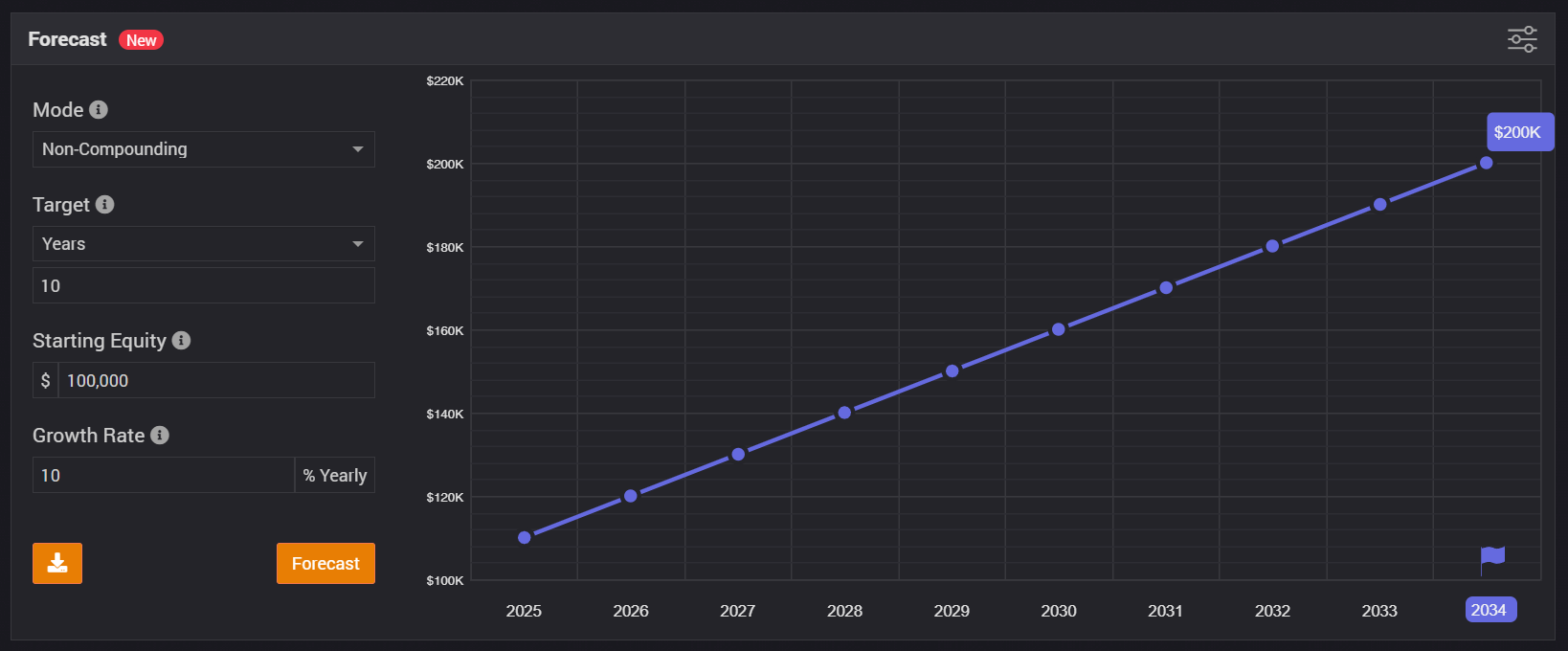
Non-Compounding Method:

What it does: The non-compounding method provides a straightforward projection of your portfolio’s growth. It assumes that any gains (or losses) you make each year are not reinvested but instead remain static.

When to use it: If you prefer a conservative estimate or want to see a baseline scenario without the effects of reinvestment, this method is for you.

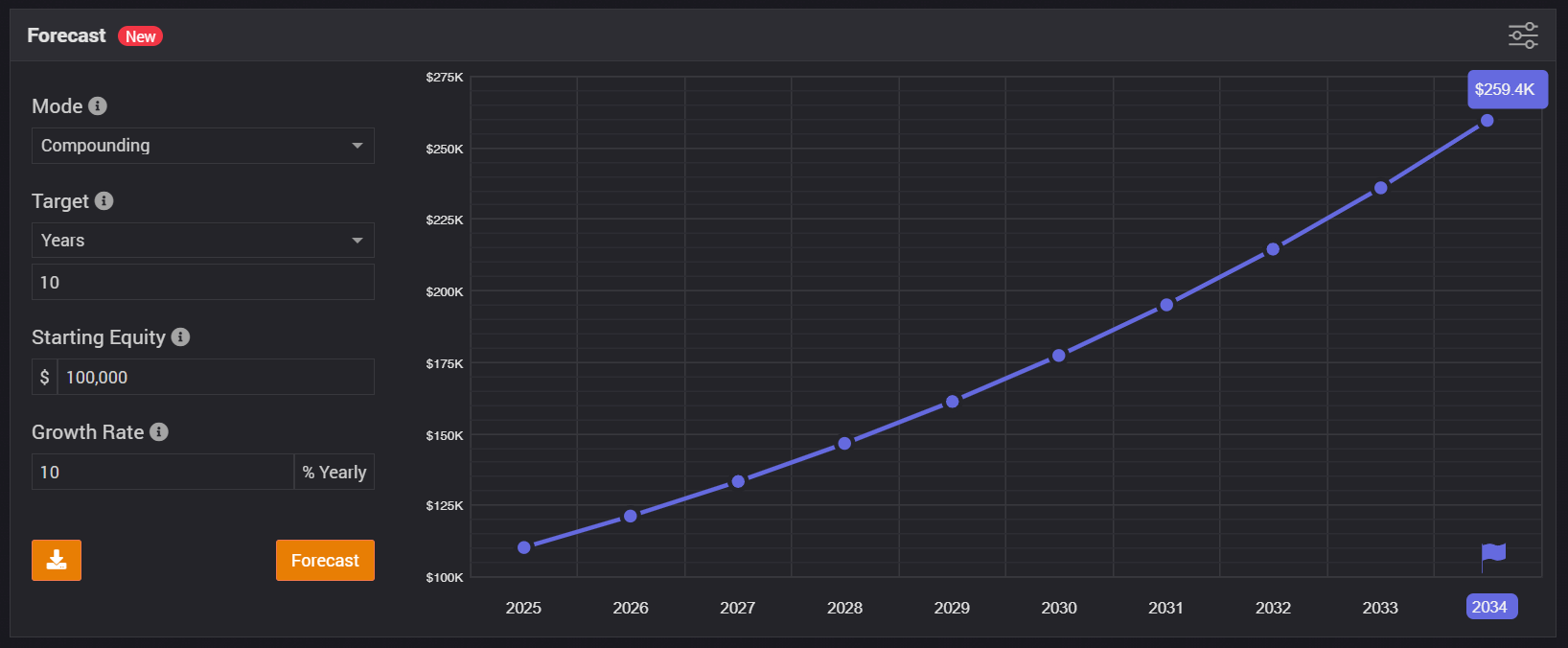
Compounding Method:

What it does: Compounding is the magic ingredient in long-term wealth building. This method factors in reinvestment of gains. As your portfolio grows, it compounds – earning returns on previous returns.

When to use it: If you’re in it for the long haul and want to see the compounding effect over time, this method is your go-to.

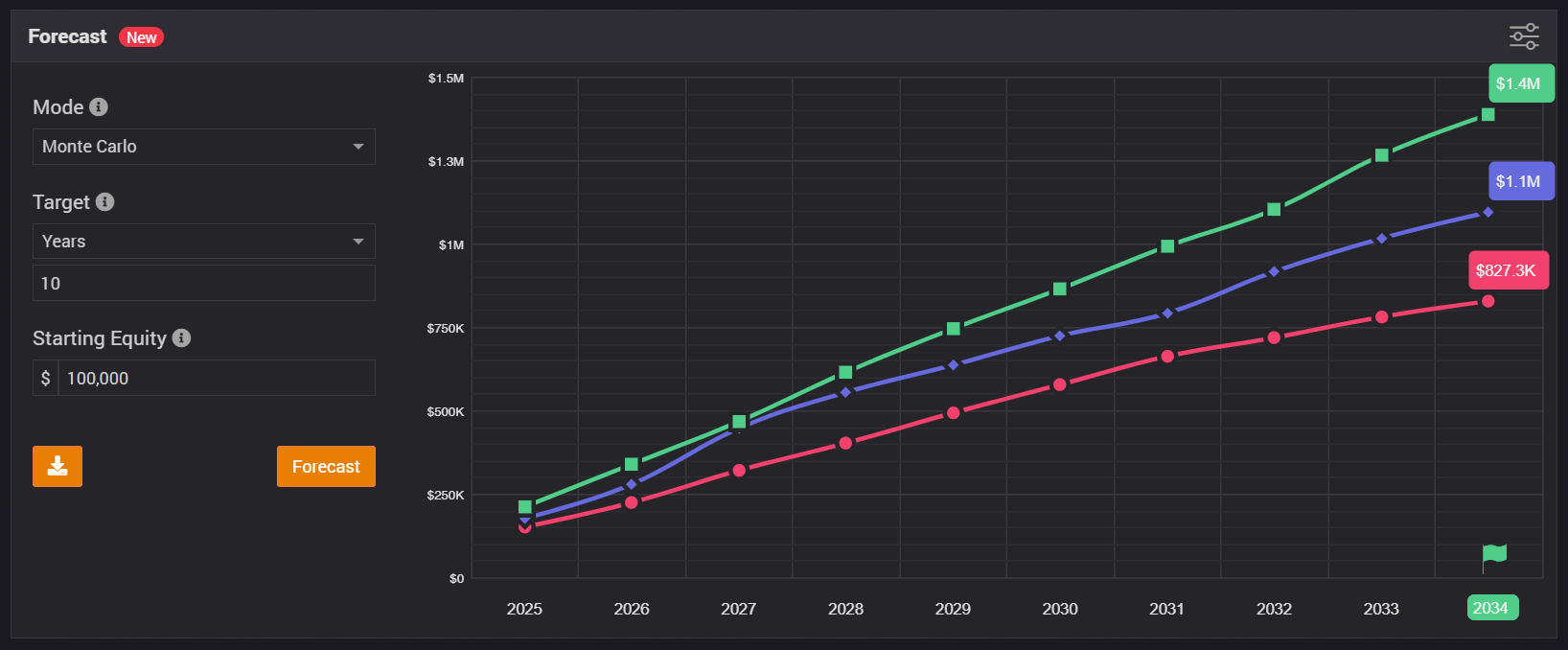
Monte Carlo Method:

What it does: Buckle up! The Monte Carlo simulation takes portfolio forecasting to a whole new level. It considers randomness, market volatility, and countless scenarios. By running thousands of simulations, it gives you a distribution of potential outcomes.

When to use it: When you crave a realistic view of uncertainty—because life isn’t a straight line. Worried about market crashes? Curious about best-case and worst-case scenarios? Monte Carlo’s got your back.


What are the different settings?

Forecast Settings

The different modes allow you to target number of years, equity, profit or growth values. You can also set a custom growth value and/or starting equity to test different scenarios.

Chart Settings

Use the options of the chart (right top corner) to view the chart in different modes. You can choose to view it in a cumulative or yearly options; you can view plot as equity, profit, or growth.

Share it

Once the forecast is generated, whether you want to keep it for reference purposes or share it with your fellow traders or anyone else, just hit the download icon to save the forecast as an image.

Margin

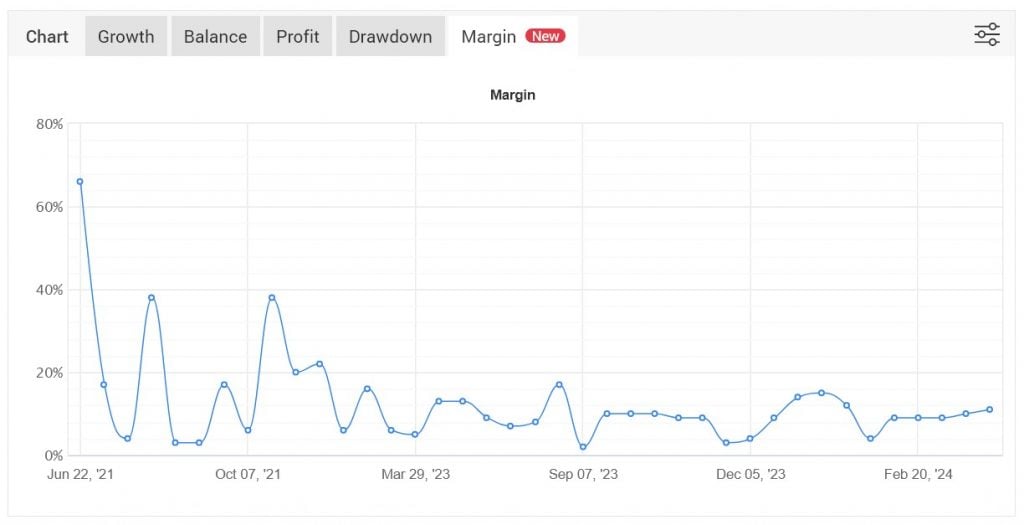
We’re happy to announce a new powerful metric addition to the statistics – margin. Margin is the amount of money you use to trade and it can tell a lot about a trading strategy. We’ve added this metric to further support your trading decisions or help analyse someone else’s trading strategy.


The new margin chart is visible at the top of a system page:

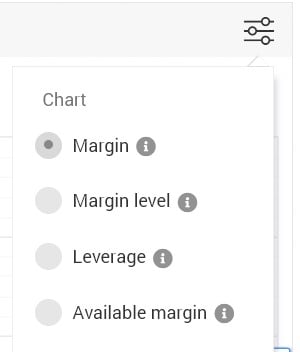
It includes 4 different chart types:


Margin – Margin is the percentage (%) value based on the amount of equity versus position value.
Margin Level – Margin Level is the percentage (%) value based on the amount of equity versus required margin.
Leverage – Actual leverage used by the account based on position nominal value versus account equity.
Available Margin – Available free margin represented as percentage (%) of total account margin.

The margin metric will help you understand if a trading system is taking excessive risks, how close was (or is) it to a margin call, and the real leverage used throughout the lifetime of the trading account.


Wishing you profitable trading, 

The Myfxbook Team.

Lot Size Calculator

Before opening a position in your Forex Trading account, calculating the correct lot size or position size may not be a simple task, especially when you’re in a hurry to open a position.

When calculating the position size, you need to take into account multiple factors:

  • trade sizing with your broker which may be a standard lots (100,000 units), mini lots (10,000 units) or micro lots (1,000 units). The trade size will affect the pip value, for example:
lot.size.example
  • the risk percentage (or alternatively the dollar amount) you can afford to lose in case the trade goes against you and hits your stop loss
  • the stop loss according to your risk appetite

Using the above inputs along with your account balance and deposit currency can be easily calculated for the different account currencies.

Most importantly, this calculation changes for each currency pair you trade and therefore it is best to use our forex position size calculator and risk calculator. lot size calculator

Keep in mind that risk is one of the most important factors – Forex is high risk and therefore you shouldn’t risk more than 5% per trade. Remember that at 10% risk per trade it takes only 10 losing trades to wipe out your account! If you’re not sure how many pips you should set for the stop-loss, head over to our pip calculator.

Our calculator covers many foreign exchange pairs:

Majors

EURUSD

USDJPY

GBPUSD

USDCHF

USDCAD

AUDUSD

NZDUSD

Minors

EURGBP

EURJPY

GBPJPY

GBPCAD

CHFJPY

EURAUD

NZDJPY

AUDCAD

AUDJPY

AUDCHF

AUDNZD

AUDSGD

CADCHF

CADJPY

CHFSGD

EURCAD

EURCHF

EURHUF

EURPLN

EURNZD

GBPAUD

GBPCHF

GBPNZD

NZDCAD

NZDCHF

Exotics

EURTRY

EURCZK

EURMXN

EURNOK

EURSEK

EURSGD

EURZAR

GBPMXN

GBPSEK

GBPSGD

GBPTRY

NOKJPY

NOKSEK

SEKJPY

USDRUB

GBPNOK

SGDJPY

USDCNH

USDCZK

USDHUF

USDMXN

USDPLN

USDSEK

USDNOK

USDSGD

USDTHB

USDTRY

USDZAR

CFD

XAGAUD

XAGEUR

XAGUSD

XAUAUD

XAUCHF

XAUEUR

XAUGBP

XAUJPY

XAUUSD

XBRUSD

XNGUSD

XPDUSD

XPTUSD

XTIUSD

Economic Calendar – a must have for traders

You can trade the markets with a fundamental, technical or mixed approach. In all cases, you must be aware of any upcoming economic events which may move the markets in your favor or against you. Knowing of the next event and its anticipated impact might produce a new trading opportunity or allow you to close your existing position before the market turns.

Using Myfxbook’s economic calendar gives you access to economic releases in real time, as they happen along with immediate interpretation of the figure, ie if the result was better than expected or worse than expected.

Our economic calendar covers events from around the worlds, no matter if their impact is low or high.

For example, for USA (largest economy with most impact)

  • Non Farm Payrolls
  • FOMC Minutes
  • FED Interest rate decisions
  • initial Jobless Claims

For UK:

  • BoE intererst rate decisions
  • Markit Services PMI
  • Gross Domesic Product (or GDP in short)

For Eurozone:

  • Retails Sales
  • Consumer Price index (or CPI in short)
  • ECB Interest rate decisions

Our economic calendar makes it very simple for you to read it;

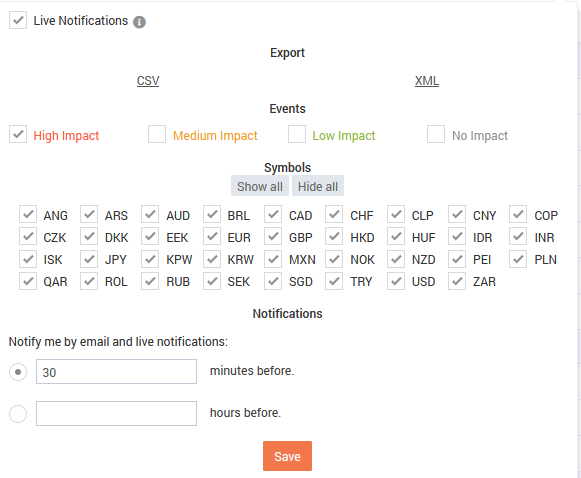
You can filter events by:

  • a time-frame (today, tomorrow, this and next week or custom)
  • by an events impact (high, medium, low or none at all)
  • by symbol (roughly 40 different symbols covering 1000 indicators)
Economic calendar settings

Moreover, the calendar shows a countdown for the next event (matched to your local timezone) so you don’t need to do any number crunching to convert the time to your local time). Also flag of the relevant country is shown next to each event.

Clicking on an event will reveal abundance of data:

  • the explanation on the event and its source.
  • the historical values of past releases of the specific economic event.

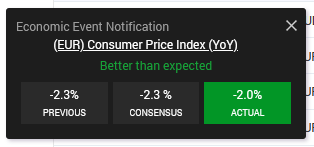
The events are updated real-time and will show a popup once released if you’re browsing our website in a different section.

Economic calendar notification

Not only our calendar is best in class, but it is also mobile friendly, so you can get the same calendar through your mobile phone, on the go.

If you’re going to be away and want to be notified by email – no problem! Set up an automated notification to your email of upcoming economic events and releases.

Our economic calendar is used by millions of traders and if you’re not one of them, you can start here:

https://www.myfxbook.com/forex-economic-calendar

Forex Outlook Indicator

We are excited to announce the release of our outlook indicator. The indicator allows you to plot the outlook data in your MT4 trading account, streaming it live and adding additional features not available in the website:

  • Plot up to 10,000 data points per timeframe(website limited to 1000 points)
  • Additional timeframes – weekly and monthly.
  • Custom colours.
  • Custom display.
  • Additional data type (Percent).

The outlook data is calculated based on the hundreds of thousands of live Myfxbook accounts (no demo accounts).

Subscribe to a yearly plan and get 2 months free: https://www.myfxbook.com/outlook-indicator

Best Regards,
The Myfxbook Team.

FIXI Trading Cup July 2018 Contest Winners Announced

The recent trading contest sponsored by FIXI Markets has ended and top 10 traders to win the prizes are:

1st place – gladkiyya 1009%, winning $3000

2nd place – Rahim 1006%, winning $1300

3rd place – ajtkr_2 829%, winning $1000

4th place – karman 639%, winning $450

5th place – Nomi099 547%, winning $400

6th place – dawoodi 518%, winning $350

7th place – MS 424%, winning $300

8th place – awvwdeyu 397%, winning $250

9th place – Teedekd 392%, winning $200

10th place – jeevash 358%, winning $150

11th place – KashiNaath 291%, winning $100

forex contest

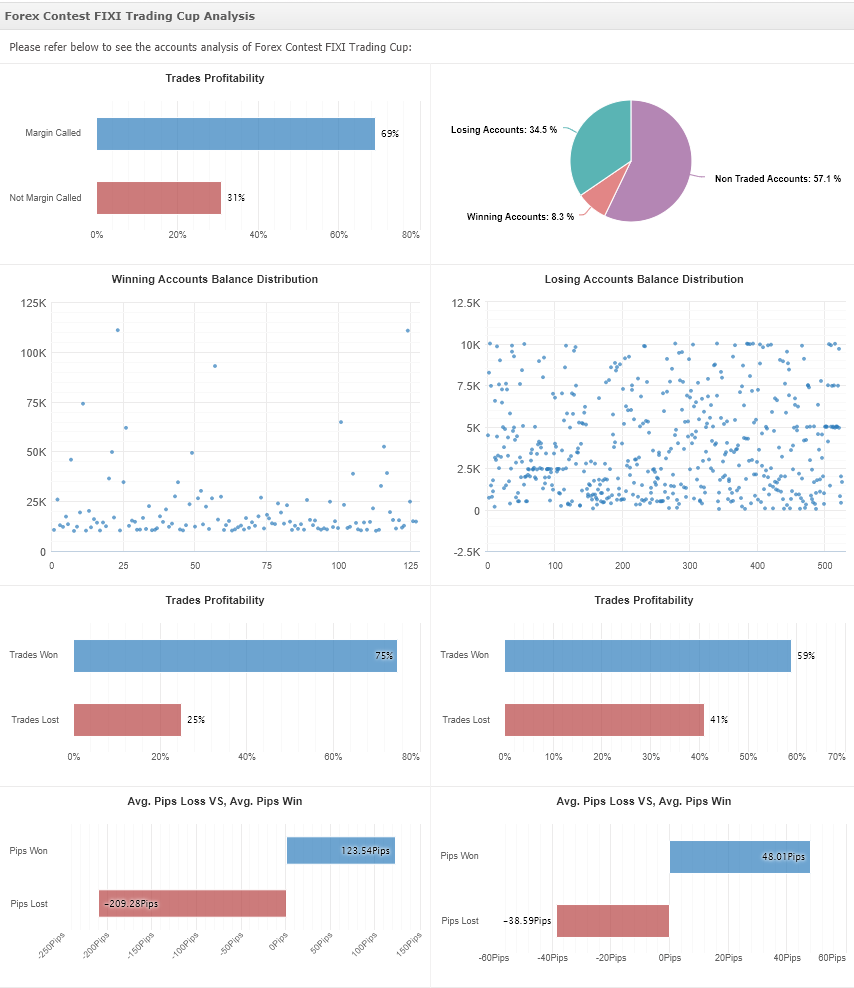
Trades profitability was very much similar between winning and losing accounts: 75%/59% of winning trades and 25%/41% of losing trades, respectively.

Average trade result in pips showed that winners had on average 2.57 times larger win than of a losing account as well as 5.42 times larger losses.

Have a great week,

The Myfxbook Team.

FIXI Markets BullsEye June 2018 Contest Winners Announced

The recent trading contest sponsored by FIXI Markets has ended and top 10 traders to win the prizes are:

1st place – Contest – presnysim 2158%, winning $3000

2nd place – Contest – Janju 2151%, winning $1500

3rd place – Contest – braggaok 1634%, winning $1000

4th place – Contest – stasiyan_trade 1039%, winning $600

5th place – Contest – Madushanka11 994%, winning $400

6th place – Contest – everytick 872%, winning $300

7th place – Contest – s1quash91 677%, winning $250

8th place – Contest – SilverForex 671%, winning $200

9th place – Contest – BullBeer 631%, winning $150

10th place – Contest – Sarahngari 589%, winning $100

Forex contest - fixi

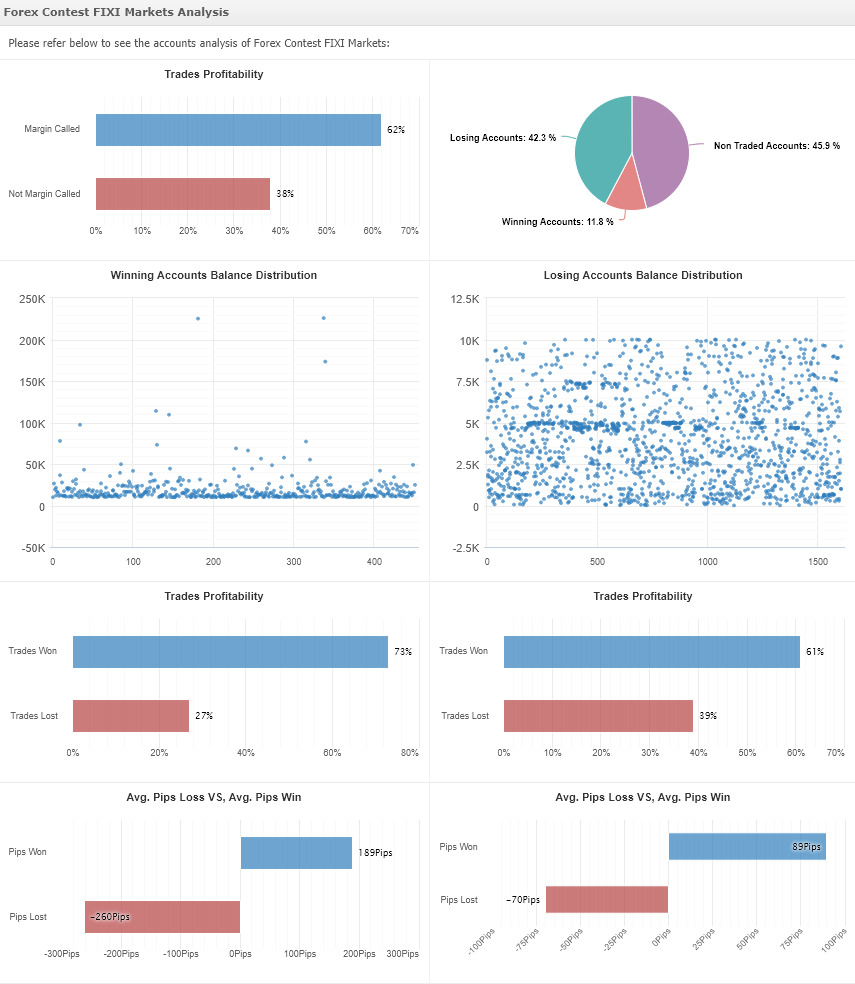
Trades profitability was very much similar between winning and losing accounts: 73%/61% of winning trades and 27%/39% of losing trades, respectively.

Average trade result in pips showed that winners had on average 2.1 times larger win than of a losing account as well as 3.7 times larger losses.

Have a great week,

The Myfxbook Team.


New Trading Contest, FIXI TRADING CUP – $7500 In Prizes

Today starts the next trading contest for 2018, with prizes in total of $7500, sponsored by FIXI Markets:

fixi

You can register freely and compete with a demo account against other traders for real prizes:

1st place: $3000

2nd place: $1300

3rd place: $1000

4th place: $450

5th place: $400

6th place: $350

7th place: $300

8th place: $250

9th place: $200

10th place: $150

11th place: $100

Trading will commence on July 1st and will end after a month of trading, after which the winners will be announced.

For more details and signup:

https://www.myfxbook.com/contests/forex-contest-fixi-trading-cup/44/rules

Have a Great Week!

The Myfxbook Team.