Features Improved

We’ve made some improvements for the automatic twitter functionality:

1. You can now use a different twitter account for each one of your connected trading accounts.

2. Limitation options for the number of tweets sent so you won’t over do it  :

  • You can limit the tweets to send only after each X’th trade/order.
  • You can limit the tweets per hour.

We’ve also improved the custom analysis function – you can now include the time of day for even better filtration accuracy:

Have a wonderful trading week!

Minor Updates

We’ve made some minor updates today:

1. System search now includes spark lines to make your life easier when browsing through the systems page.

2. Trading privileges verification no more requires closing a trade; it’s enough to open a pending order, which you may cancel after the trading privileges have been successfully verified.

We’ve also tested, fixed and made our website fully compatible with the Opera browser.

As always, several other bugs which were reported during the week, were fixed.

We’re working on a lot of new and exciting features, so stay tuned!

Trade well!

The Myfxbook team.

2 New Features

Well, it’s been a really stressful week for our servers! We didn’t expect such a quick growth in such a short period of time, which resulted in slow browsing and delayed account processing. We’re glad to say that we’ve successfully added additional servers during the weekend, which should eliminate the load. Just to give you an idea, our servers process over 8000 trading accounts!

Now to the more  interesting part of this post:

We’ve added 2 new highly requested features :

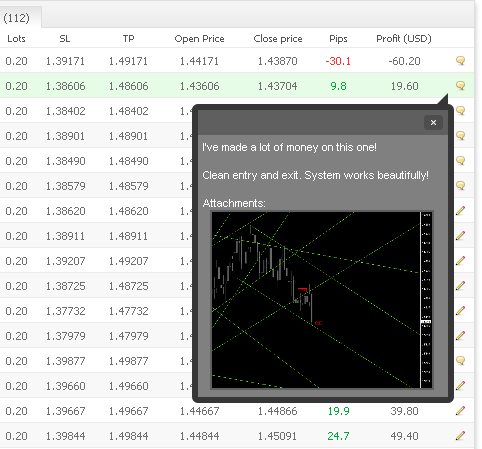
1. The ability to save an image for each of your trades in the history, allowing you to keep an exact record as to why did you enter, exit, lose or profit on a particular trade.

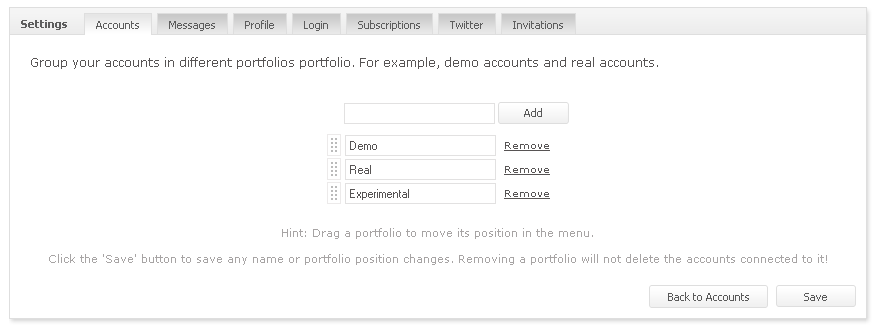
2. Multi-portfolios – We’re aware that most users have multiple demo/real accounts and it’s hard to keep track of all of them. Now you can group your accounts into specific groups, for example demo and real.

Once you create and move an account to a specific portfolio, you will see the group in your portfolio menu, giving you a quick access to your accounts.

(After adding a portfolio, click the ‘Back to Accounts’ button and use the new combo to assign an account to a specific portfolio).

Have a great trading week!

The Myfxbook Team.

Widgets Who?

We always receive the same question – what are widgets and how do I use them? So today we’ve decided to dedicate a blog post regarding this matter (with some new features of course!).

Widgets are just another way of advertising your trading system, either you’re posting in a forum (forum post/signature, use the BB code) , your blog (Html code), or your own website (Html Code). An important thing to note is that even though the widgets are images, the widgets are dynamic and update as soon as your trading data is updated at Myfxbook. So once you post the widget, the data in the widget will always be up to date with the most recent data, with no need to re-post results or manually post updates.

We’ve redesigned the widgets page a bit to make it easier to use and with some new options (ability to link directly to your statements or your member page), you will also see the widgets link in your right upper panel after logging in.

As we’ve also been requested to make some custom widgets with different sizes, today we release the new widgets (Our design team worked hard to achieve the results below so we do hope you like them!)

And we’ve also added a completely customizable graph widget allowing you to create unlimited different layout combinations:

As you can notice in the images, the new widgets show the results as verified by Myfxbook. Obviously, only fully verified accounts will include the “Verified by Myfxbook.com” statement; non verified accounts will only state “Myfxbook.com”.

We’ve also changed the limitation of the widgets to show only in public accounts – if you don’t want to make your account public but still want to use our widgets, it’s now possible.  Please note that in such case the widget will be static and will not update the data.

Another new feature is a timezone setting (Settings, Profile tab):

You can now set your timezone, so all of the website’s timestamps are synced to your local time (including news and economic calendar; statements and trading activity are in GMT as this is the timezone our systems use to perform the calculations).

Also, we had a minor issue with the PDF statement not being created properly on Internet Explorer 8 – it is now fixed.

Have a great trading week!

The Myfxbook team.

So Who's Watching Me?

We hope you enjoyed the holidays – we know we did!

Today we release another feature – the track list. You now know who’s exactly tracking your and other’s systems.

To see who’s tracking you, click the  ‘Tracking’ link:

And see the who they are:

Thanks for the members who suggested it!

2 New Features!

Again, another long awaited feature is released today.

Since an account can have different periods of trading, accommodating different trading techniques learned and implemented through your entire trading career, the entire performance is obviously not relevant if you’re looking for clients, developing your latest trading idea, or just following someone else’s trading.

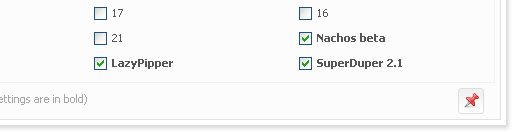
Here comes into play our latest feature – a custom period publish function. You can find it in your portfolio, when viewing a system, in the custom analysis window, a pin button:

Once pressed, our systems will recalculate your account in real time (including widgets) and will simulate your growth based on your start date (Click the ‘Analyze’ button to preview the changes). Then it will be saved as the default start date for your account .

Please note, due to transparency issues, prior dates are not hidden from the user in your public system page; moreover, if you use this feature, your public system page will include a disclaimer at the top to let others know that you’re using a custom start date:

Of course, it can be disabled at any time, or adjusted in case the start date was selected incorrectly.

Besides the default start date, if you have several EA’s trading your account, you can now set the default magic numbers to show in your charts (growth and balance).

Apart from the new features, numerous fixes were made which were reported by users (twitter issues, missing subscription notifications, calculation discrepancies, minor interface changes for better usability, long posts issue).

Another important fix was for non-English character support – our platform now supports all languages!

That’s it for now,

We’re wishing you all a merry Christmas and a prosperous New Year!

Verification system is finally here!

Well, it took us some time and a lot of effort, but we’ve finally made it! This one was our most complicated and most requested feature.

If you now view a system or your own portfolio, you will most likely to notice the latest addition:

As you can see, 2 major issues (MetaTrader accounts) are resolved with our verification system (Check the help section for instructions):

1. False performance, which could be easily manipulated by uploading fake account statements.

2. Users who use the investor password to publish the account as if it were theirs.

The first issue is resolved by using your investor password (Can be inputted in the account settings form) – we connect several times a day directly to your broker and download your original trading history. The original trading history is then compared against the data sent to us by you and if no discrepancies are found, your track record will be automatically marked as verified. However, if discrepancies are found, they will be corrected using the original data from your broker, and your account will be recalculated automatically.

The second issue is resolved by verifying your trading privileges using a unique key we give you (Can be also found in your account’s settings form). Once you receive the key, you will then be required to open a trade in your trading account (You can use the smallest trade size possible) with the key as the trade’s comment – when we will connect to your account with the investor password and locate the key we gave you, your account will be verified for trading privileges. On that note, if you spot someone publishing your account as if it were theirs with your investor password – just let us know and it will be removed immediately.

Oanda’s accounts are marked immediately as verified both for the track record and the trading privileges as the data comes directly from Oanda’s servers, and the trading history link can be obtained only if you have access to the trading platform.

For the next several weeks, we will be tweaking and modifying our systems for the verification system to work as smoothly as possible, so if you encounter an issue, please let us know and as always we will resolve it as soon as possible.

The new verification system also changes the systems search concept – only verified systems will appear on the systems page!

This major enhancement also comes with another 3 new long-awaited export features (at the top of a system page):
1. The HTML export option can be used to embed your account statement on your blog/website, including history sort capability and a short statistical summary of your account’s performance.

2. The CSV export option is meant for those who want to make some calculations of their own in Excel (Is Myfxbook really not enough? ).

3. The PDF export option will enable you to create a clean PDF statement, allowing you to easily print your trading history.

As with all of our data sharing features, these are fully customizable as to the level of the information you want to share (account permissions also apply here), or with whom to share it (Invitations).

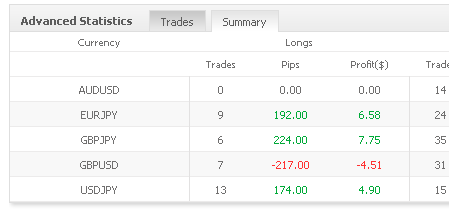
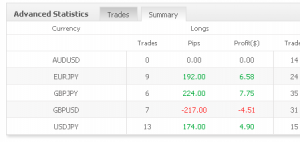
Oh, before we forget, there is one more feature added  – dollar values for the advanced statistics summary, so you now know exactly how much money did you win or lose specifically in each currency (new stats will appear after your next data update).
Well, that’s it for now, and we do hope you can make good use of these new additions.

Have a prosperous trading week!

Minor Updates

Minor changes were done today;

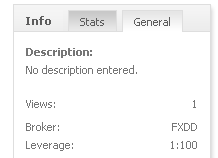
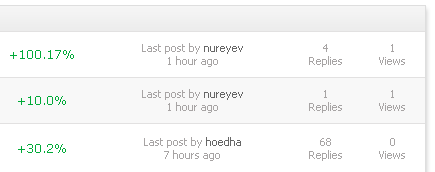
Topics and systems now have a view count, so you can know if your topic or system is popular among Myfxbook users.

Total lots (or units in case of Oanda accounts) are now seen in open orders:

Also, we would like to thank you for helping  us develop and test our verification system by filling in the required details in the account settings – we’re making progress, and hopefully it should be ready in a week.

Have a successful trading week!

Website Is Down

Hi everyone,

We’re currently experiencing some issues with our servers, and working as fast as we can on resolving it.

Thank you for your patience.

Update  – Website is back up, we’re trying to figure out what went wrong.

Update We’ve found what caused it. Maintenance will be performed at the weekend to rectify the issue.