We’re excited to announce another super advanced section (which is yet again another powerful tool for any trader, unique to Myfxbook!) – Patterns:
Trading Patterns
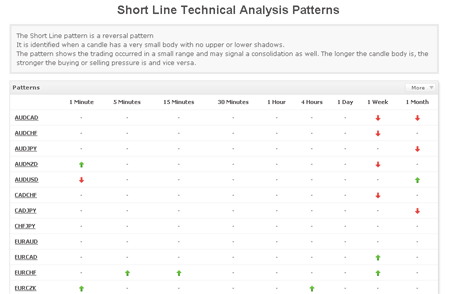
Any technical trader knows that searching for a pattern in a chart is a very tedious task and time consuming task – well no more! The new section allows you to view in real time, 60 different trading patterns for over 60 different symbols in 9 different time-frames in a single glance! Our systems will constantly scan the prices for patterns in real-time and will show you (in real time) of any such pattern forming. Not only the pattern is identified, but it is immediately seen if it is a bullish pattern or a bearish one. For your convenience, each pattern has a complete definition.
Important to note that some patterns are neutral ones and so you’ll have to determine the bias (bullish or bearish) on your own. A bullish pattern will be marked with an up arrow (), a bearish one with a down arrow () and a neutral one with a orange circle ().
You can either check the Pattern section to view selected symbols and patterns, click on a specific symbol to view its selected patterns or click on a pattern to view where the pattern occurs with selected symbols only.
The pattern section covers the following patterns:
We’re happy to announce another trading contest which will be held simultaneously with the previously announced contest, available this time for all traders except US and Japanesetraders (if you’re from US/Japan, please click here), sponsored by 24FX; a total of $5000 in prizes will be given out to the top traders!
Registration starts today (April 15th) and will be open until May 1st. The competition will be held for a month and will start with a starting balance of $10,000 (demo account) and a leverage of 1:400.
In total, 3 prizes will be given out to top 5 traders:
We’re happy to announce a new trading contest, available this time for US and Japanese traders only (if you’re not from US/Japan, please click here), sponsored by Forex Broker Inc; a total of $5000 in prizes will be given out to the top traders!
Registration starts today (April 15th) and will be open until May 1st. The competition will be held for a month and will start with a starting balance of $20,000 (demo account) and a leverage of 1:500.
In total, 5 prizes will be given out to top 5 traders:
We’re very excited to announce a new trading contest sponsored by TenkoFX; The contest’s prize fund is the largest ever, with $10,001 in prizes!
TenkoFX Contest
Registration starts today (March 1st) and will be open until March 16th. The competition will be held for a month and will start with a starting balance of $10,000 (demo account) and a leverage of 1:200.
In total, 5 prizes will be given out to top 5 traders:
A new year has started and we haven’t stopped development! 3 new features were added this week based on your feedback:
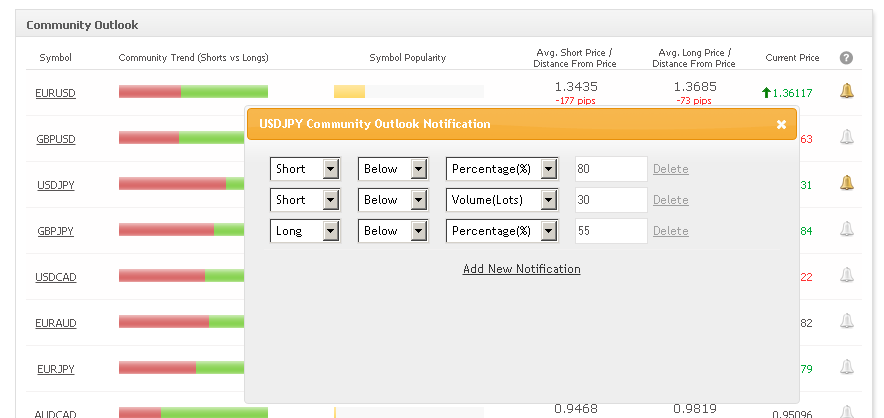
Community outlook notifications – you can now set unlimited, pre-determined levels for the community outlook, per symbol, to be notified in real time once those levels are breached. You can set either a long or a short notification based on percentage, volume, or positions.
Community Outlook Notifications
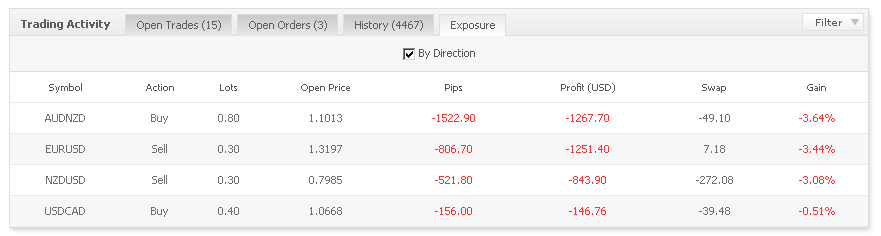
Open positions Exposure – when trading multiple currency pairs in different directions or scaling in and out of a position, it is difficult to understand your current total exposure, but no more – you now have an exposure tab which will reveal you in one quick look the exact exposure of your account to the market – you will see total lots, total profits and average entry price based on a currency pair which can also be broken down based on trade direction. For example with the image below, you can see that 15 open trades show in the Exposure tab as only 4, which is simpler and easier to understand:
(Keep in mind the exposure tab inherits the same privacy settings of your open trades, ie for example if you hide open trades, the exposure data will be also hidden).
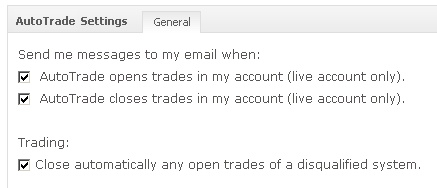
Trade Management when AutoTrade provider is disqualified – up until now, when a system was disqualified from AutoTrade, any of its open positions were automatically closed in follower accounts. Now you can control this setting in case you wish to leave such trades open (these settings can be accessed from the main AutoTrade page, by clicking the settings icon ):
AutoTrade Settings
We’re working on some new sections for Myfxbook so stay tuned :).
Winners, you’ll be contacted by Excel Markets to claim your prizes.
Moving on to the contest’s analysis:
Excel Markets Contest Analysis
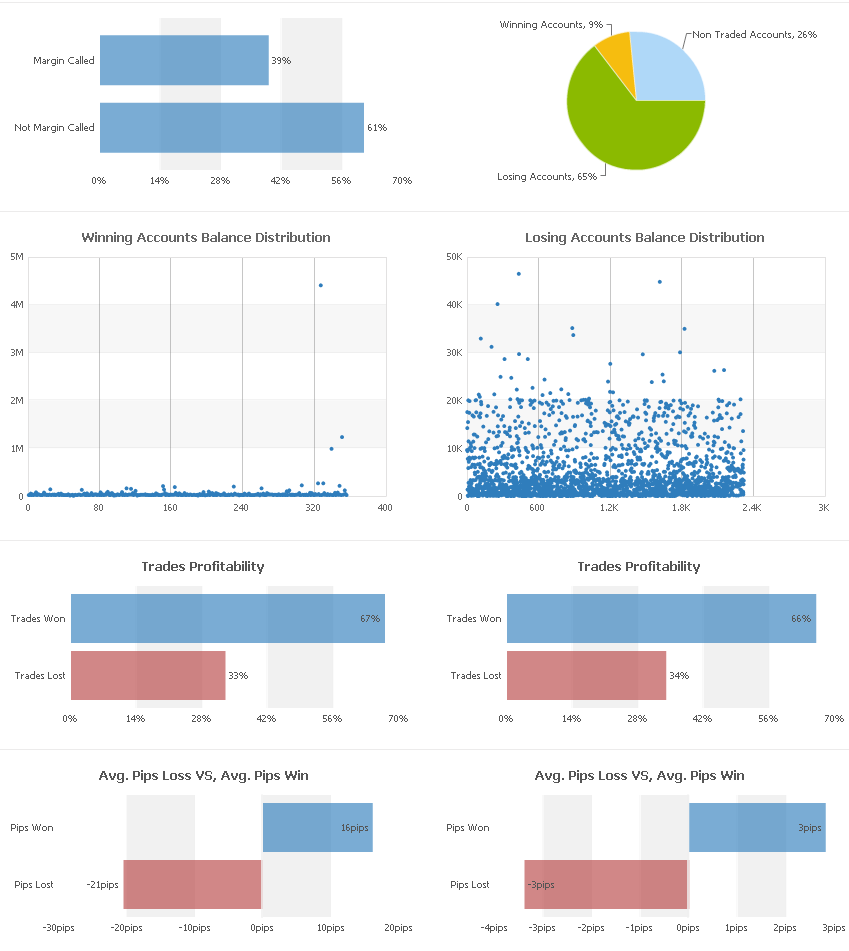
If you click on the above info-graphic, you’ll find the following data:
– 26% of accounts didn’t open a single trade. Out of the remaining 74%, only 9% of accounts were profitable while 65% lost money.
– Almost 40% of accounts got margin called
– The 1st place ended way ahead of the competitors.
– Winning and losing accounts had almost identical trade profitability (66% win, 34% losses)
– Winning accounts had 5 times a larger average win (16 pips) versus the losing accounts (3 pips) yet also a 7 times larger average loss (-21 pips) vs the losing accounts (only -3 pips).


 ), a bearish one with a down arrow (
 ) and a neutral one with a orange circle (
 ).


 ):