



Advertisement
MetaTrader 4 EA Connection Wizard
1. Download and install the Myfxbook EA installer EaInstaller.exe
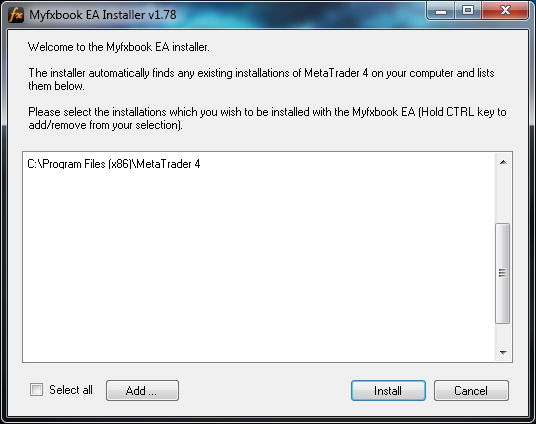
Windows 7 users - please run the file in administrator mode (Right click>Run as administrator).
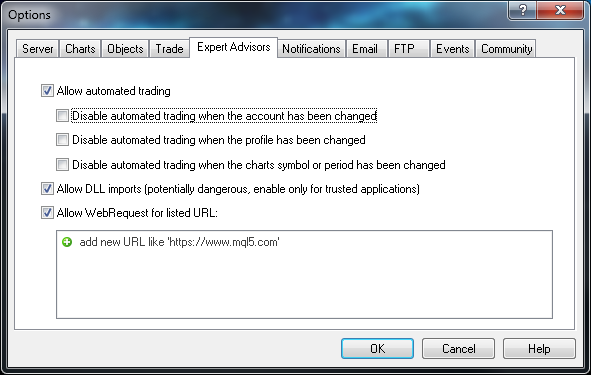
2. Restart MetaTrader 4 and go to Tools>Options>Expert Advisors. Set the following settings and click ok:
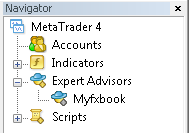
3. Open the navigator (View>Navigator) and find the Myfxbook EA in the 'Experts Advisors' tab:
4. Double click on the Myfxbook EA or drag it on any chart to activate it (Keep in mind MetaTrader 4 allows only 1 EA per chart and only one Myfxbook EA is required to publish data):
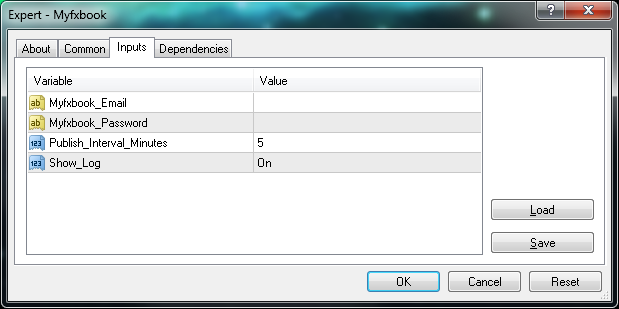
Set the settings:
| Field | Value |
|---|---|
| Myfxbook_Email | Your Myfxbook login email. |
| Myfxbook_Password | Your Myfxbook password. |
| Publish_Interval_Minutes | Publish your account every X minutes. *Account will not update more than once every 5 minutes. |
5. After saving the settings, you should see a smiley at the top right corner of the chart you've attached the EA to:
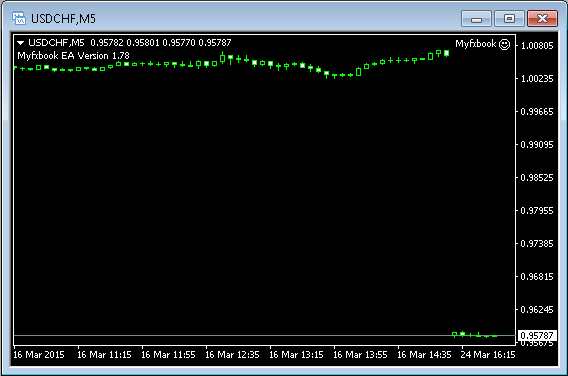
And in the 'Experts' tab:

You're done! Your account will be processed and added to your Myfxbook portfolio within 60 seconds!
If the markets are closed (weekends), please wait until they are opened as the EA will not work until then.
Your account will be updated every 5 minutes whenever your trading platform is open and the markets are open.
Manual Installation (build 600 and above)
If the installer doesn't start, please make sure you have installed .NET Framework 4.0.
Alternatively, you can manually download and install the needed files here: Myfxbook.ex4, and Myfxbook.dll
1. In your MetaTrader 4, Click File > Open Data Folder.
2. Place the Myfxbook.dll file in MQL4/libraries folder of your MT4 installation.
3. Place the Myfxbook.ex4 file in the MQL4/experts folder of your MT4 installation
4. Restart MT4.